
Introduction: Why Image Optimization SEO Matters More Than Ever in 2026
If you’re serious about ranking higher in Google in 2026, ignoring image optimization SEO is no longer an option—it’s a costly mistake.
Search engines have evolved far beyond text. Today, Google evaluates visual content, page speed, and user experience as core ranking factors, especially under Core Web Vitals. This means your images are not just design elements—they are SEO assets that directly impact your visibility.
Let’s break it down.
When a webpage loads slowly due to heavy, unoptimized images, users leave. This increases bounce rate and sends negative signals to Google. On the other hand, properly optimized images improve:
- ⚡ Page loading speed
- 📱 Mobile performance
- 👁️ Visual engagement
- 🔍 Search engine understanding
This is exactly where image optimization SEO becomes powerful.
In fact, websites that actively optimize images for SEO often see improvements in both:
- Organic rankings
- Image search traffic
And here’s something most beginners miss…
Google doesn’t “see” images the way humans do. It relies on signals like:
- File names
- Alt text
- Image size
- Context around the image
Without proper optimization, your images are invisible to search engines.
🚀 What You’ll Learn in This Guide
In this complete 2026 guide, you’ll discover:
- 12 powerful image SEO techniques that actually work
- How to reduce image size without losing quality
- The role of modern formats like WebP
- How to align images with your overall on-page SEO checklist
Whether you’re running a blog, affiliate site, or business website, mastering image optimization SEO will give you a competitive edge—especially in the USA market where performance standards are higher than ever.
Let’s start with the fundamentals in the next section.
Core Fundamentals of Image Optimization SEO (How Google Understands Images)
To truly master image optimization SEO, you need to understand how Google actually processes images behind the scenes.
Unlike humans, Google doesn’t “see” visuals—it interprets data signals. This is why simply uploading a high-quality image is not enough. You must structure it in a way that search engines can understand.
This directly connects with your keyword strategy and overall on-page optimization.”
🔍 How Google Reads Images
Google relies on multiple elements to interpret an image:
- File name → Describes what the image is about
- Alt text (alternative text) → Provides context for accessibility and SEO
- Surrounding content → Helps Google connect the image to your topic
- Image size & format → Impacts loading speed and performance
When all these elements are optimized together, your chances to optimize images for SEO improve significantly.
⚙️ The 3 Core Pillars of Image SEO
To simplify things, every successful image optimization SEO strategy is built on three pillars:
1. Relevance
Your image must match the content.
For example:
If your article is about internal linking strategy, your images should visually support that topic—not random stock photos.
👉 This helps Google connect your visuals with your keywords.
2. Performance
Heavy images slow down your site.
- Large file sizes = slow loading
- Slow loading = poor user experience
- Poor UX = lower rankings
Using proper image compression SEO techniques ensures your site stays fast while maintaining quality.
3. Context
Google uses surrounding text to understand images.
This includes:
- Captions
- Headings
- Paragraphs near the image
👉 This is why placing images strategically within your content matters.
📈 Why These Fundamentals Matter in 2026
With Google prioritizing Core Web Vitals and mobile-first indexing, image optimization SEO is no longer optional—it’s essential.
Websites that fail to optimize images for SEO often struggle with:
- Low rankings
- Poor page speed scores
- Missed traffic from Google Images
Understanding these fundamentals sets the foundation for everything that follows.
12 Powerful Image Optimization SEO Techniques
Now that you understand the fundamentals, it’s time to implement real strategies that drive results.
These first techniques are the foundation layer of effective image optimization SEO—simple to apply, but highly impactful.
✅ 1. Use SEO-Friendly Image File Names
Before uploading any image, rename it properly.
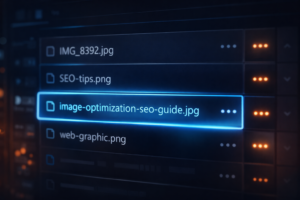
❌ Bad example:IMG_8392.jpg
✅ Good example:image-optimization-seo-guide.jpg
Why this matters:
Google reads file names to understand image context, which aligns with SEO URL structure best practices.
A clear, keyword-rich name helps improve relevance.
👉 This is one of the easiest ways to optimize images for SEO without extra tools.
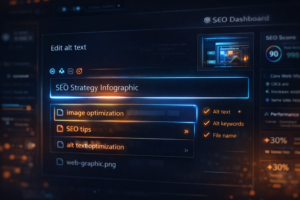
✅ 2. Add Descriptive Alt Text (Must for SEO + Accessibility)
Alt text (alternative text) is critical for both:
- Search engines
- Screen readers
Example:alt="image optimization SEO techniques for faster website loading"
Best practices:
- Keep it natural (no keyword stuffing)
- Describe the image clearly
- Include your keyword only if relevant
Using proper alt text SEO improves both rankings and accessibility compliance.
✅ 3. Compress Images Without Losing Quality
Large images slow your website—this directly hurts rankings.
Use image compression SEO techniques to reduce size while maintaining visual quality.
Recommended approach:
- Compress before uploading
- Keep file size under 100KB when possible
- Maintain clarity for user experience
👉 Faster images = better Core Web Vitals = higher rankings
✅ 4. Choose the Right Image Format
Not all formats are equal.
Here’s what works best in 2026:
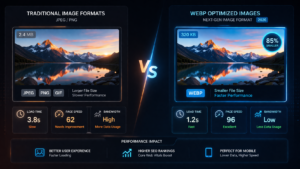
- JPEG → Best for photos
- PNG → Best for graphics with transparency
- WebP → Best overall (smaller size + high quality)
Modern websites are shifting towards webp images seo strategies because they load significantly faster.

🚀 Why These Techniques Matter
These basic optimizations create a strong technical foundation for image optimization SEO.
If ignored, even the best content can struggle to rank.
If implemented correctly, they:
- Improve page speed
- Increase visibility
- Enhance user experience
Advanced Image Optimization SEO Techniques
Once your basics are strong, the next step is implementing advanced strategies that give you a real competitive edge in image optimization SEO.
These techniques directly impact performance, scalability, and user experience—all critical ranking factors in 2026.
⚡ 5. Implement Lazy Loading for Faster Performance
Lazy loading ensures images load only when needed.
Instead of loading all images at once, your website loads them as users scroll.
Benefits:
- ⚡ Faster initial page load
- 📉 Reduced server load
- 📈 Improved Core Web Vitals
Most modern CMS platforms (like WordPress) support this by default, but always verify it’s working.
👉 This is a key method to optimize images for SEO while boosting speed.
📱 6. Use Responsive Images for All Devices
Your images must adapt to different screen sizes.
Responsive images ensure:
- Smaller images for mobile devices
- High-quality images for desktops
This improves:
- Mobile usability
- Page speed
- User experience
Google prioritizes mobile-first indexing, so this step is critical for image optimization SEO success.
🧩 7. Add Image Structured Data (Schema Markup)
Structured data helps search engines understand your images better.
By adding schema markup, you can:
- Improve visibility in rich results
- Enhance image indexing
- Increase click-through rates
Examples include:
- Product images
- Blog visuals
- Infographics
👉 This is an advanced but powerful image seo technique often ignored by beginners.
🔗 8. Optimize Image Placement Within Content
Where you place your image matters.
Best practices:
- Place images near relevant text
- Align with headings (H2/H3)
- Avoid random placement
This improves:
- Content flow
- User engagement
- SEO relevance signals
🚀 Why These Advanced Techniques Matter
At this level, image optimization SEO becomes a performance strategy, not just a checklist.
Websites using these techniques often outperform competitors because they:
- Load faster
- Deliver better UX
- Send stronger ranking signals
Expert Image Optimization SEO Techniques + Common Mistakes to Avoid
At this stage, you’re no longer just applying basics—you’re refining your strategy to outperform competitors using advanced image optimization SEO practices.
Let’s go deeper.
🚀 9. Use Image CDN for Faster Global Delivery
If you’re targeting USA traffic, speed across regions matters.
An Image CDN (Content Delivery Network):
- Stores images on multiple global servers
- Delivers images from the nearest location to the user
Benefits:
- ⚡ Ultra-fast loading times
- 🌎 Better international performance
- 📈 Improved SEO rankings
👉 This is essential for scaling image optimization SEO on high-traffic websites.
🏷️ 10. Add Captions for Better Engagement
Captions are often ignored—but they are powerful.
Why captions matter:
- Users read captions more than body text
- They provide extra context to search engines
- Increase time-on-page
Example:
“Proper image optimization SEO improves both speed and rankings.”
👉 Captions enhance both UX and relevance signals.
🧠 11. Optimize Image Context with Surrounding Content
Images should never exist in isolation.
To optimize images for SEO, ensure:
- Keywords appear naturally around the image
- Headings support the image topic
- Content explains what the image represents
This strengthens topical relevance and improves indexing.
🧪 12. Test & Audit Your Images Regularly
SEO is not one-time—it’s continuous.
Use audits to check:
- Image sizes
- Broken images
- Missing alt text
- Slow-loading visuals
Regular audits help maintain strong image optimization SEO performance over time.

❌ Common Mistakes to Avoid
Avoid these critical errors:
- Uploading large, uncompressed images
- Missing or keyword-stuffed alt text
- Using irrelevant images
- Ignoring mobile optimization
- Not using modern formats like WebP
👉 These mistakes can silently damage your rankings.
🔥 Final Insight
At the expert level, image optimization SEO is about consistency and precision.
Small improvements here can lead to:
- Faster websites
- Higher rankings
- Better user engagement
Best Tools & Workflow for Image Optimization SEO (Real Implementation Strategy)
Knowing techniques is one thing—but implementing them consistently is what separates average sites from high-ranking ones.
To scale image optimization SEO, you need the right tools and a repeatable workflow.
🛠️ Essential Tools for Image SEO in 2026
Here are some of the most effective tools professionals use:
🔧 Compression Tools
- TinyPNG / TinyJPG → Easy and effective compression
- ImageOptim → Great for bulk optimization
👉 These tools help apply image compression SEO without losing quality.
⚡ Format Conversion Tools
- Squoosh (by Google)
- CloudConvert
These allow you to convert images into modern formats like WebP using the WebP image format, improving performance instantly.
📊 Performance Testing Tools
- Google PageSpeed Insights
- GTmetrix
These tools show how your images impact:
- Load time
- Core Web Vitals
- Overall SEO score
🔄 Step-by-Step Image SEO Workflow
Follow this simple workflow to consistently optimize images for SEO:
- Choose the right image (relevant to your content)
- Rename the file with a keyword-rich name
- Compress the image before upload
- Convert to WebP format if possible
- Upload and add alt text
- Place image strategically in content
- Test page speed after publishing
Place images strategically within your content as part of a strong internal linking strategy SEO.
👉 This workflow ensures every image contributes to your image optimization SEO strategy.

📈 Pro Tip: Batch Optimization for Scaling
If you’re publishing regularly:
- Optimize images in bulk
- Use plugins (like WordPress optimization tools)
- Automate compression and lazy loading
This saves time and ensures consistency across your site.
🚀 Why Workflow Matters
Without a system, optimization becomes inconsistent.
With a proper workflow:
- Your site stays fast
- SEO performance improves steadily
- You reduce technical errors
This is how professionals scale image optimization SEO effectively.
Conclusion: Mastering Image Optimization SEO for Long-Term Rankings
By now, it’s clear that image optimization SEO is not just a technical task—it’s a core ranking strategy in 2026.
Websites that consistently optimize their images gain a strong advantage in:
- ⚡ Page speed performance
- 📱 Mobile usability
- 🔍 Search engine visibility
And most importantly—they deliver a better user experience.
🎯 Key Takeaways
Let’s quickly summarize what truly matters:
- Always optimize images for SEO before uploading
- Use proper file names and descriptive alt text
- Apply image compression SEO to maintain speed
- Use modern formats like WebP
- Implement lazy loading and responsive images
- Maintain strong content-image relevance
👉 These are not optional—they are essential.
📈 EEAT Perspective (Why Google Trusts Optimized Sites)
From an EEAT (Experience, Expertise, Authority, Trust) standpoint:
- Fast-loading pages signal professionalism
- Optimized visuals improve accessibility
- Structured content enhances credibility
When combined, these signals help Google trust your website more.
That’s why advanced image optimization SEO directly contributes to long-term ranking stability.
🚀 Final Insight
Most websites still ignore image optimization.
This creates an opportunity.
If you implement everything from this guide, you position your site ahead of competitors—especially in the highly competitive USA market.